

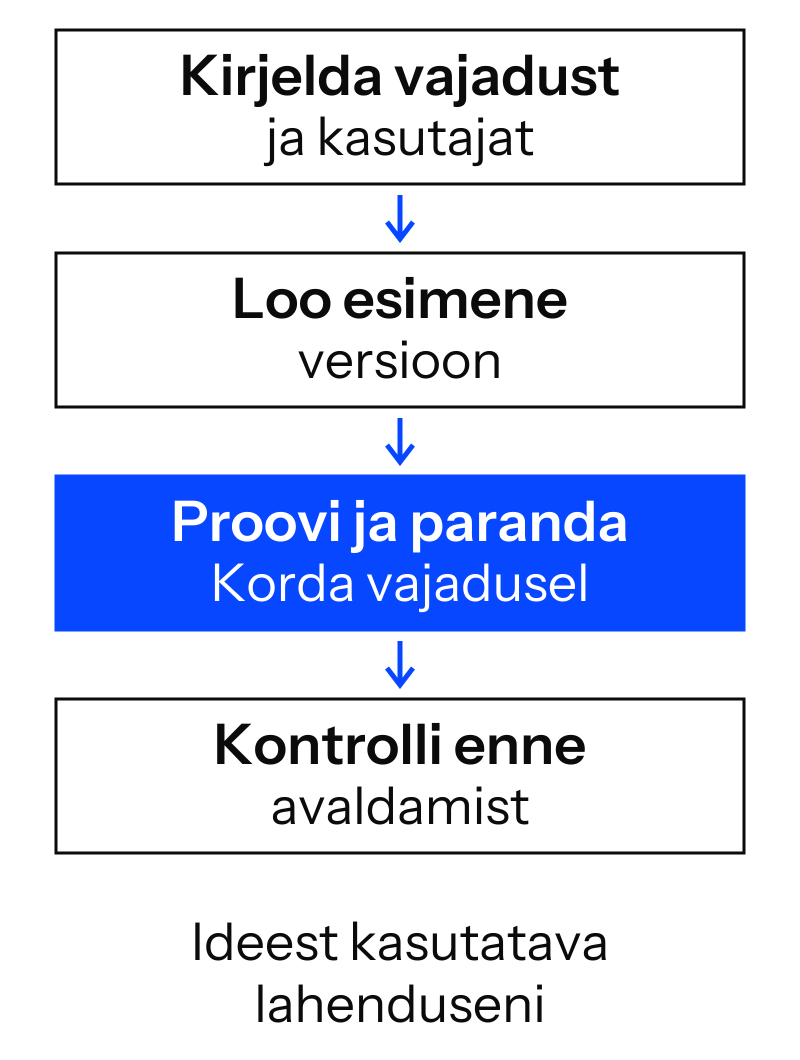
In its broader use, vibe coding means creating software with AI: you describe the result in everyday language, and AI writes or changes the code. You explain what you need, try the result and give the next instruction. This makes it possible to start building a website, small application or tool without previous programming experience.
For me, the most exciting part is straightforward. You have an idea for making a task easier, and you can now test it. It no longer has to remain a tool you wish someone would build one day.
But the first screen does not tell you whether the whole solution works. That distinction is worth understanding early. It also helps you decide whether to start with Lovable, Claude Code or OpenAI Codex.
What does vibe coding mean, and where did the name come from?
The term vibe coding was popularised by AI researcher Andrej Karpathy on 2 February 2025. In his original description , it was a fairly free-form experiment: give AI instructions, look at the result and move on without reading all the generated code.
Today, people often use vibe coding to mean almost any kind of building with AI through conversation. The same term can therefore describe an evening experiment or a carefully managed development process with reviewed changes and testing.
I want a result I can use in my work. Alongside a good instruction, that requires knowing what to check and when to involve a specialist. There may be less code to write manually, but understanding my needs remains my responsibility.
An example: a price calculator for your service
Take a simple example. A service provider repeatedly answers questions about the cost of a job. The price depends on quantity and selected extras. A basic calculator would let customers explore an approximate total themselves.
The first version does not need user accounts, payments or a complete business management system. One screen is enough: enter a quantity, select an extra and see the calculation. I would start with fictional prices so the experiment could not accidentally be mistaken for a quotation.
For example, you could give AI this instruction:
Build an Estonian-language prototype of a service price calculator. The user enters a quantity and can choose an optional extra. The illustrative price is 20 euros per unit; the extra costs 15 euros in total. Show the total and explain the calculation. Quantity must be a positive whole number. Show a clear error for empty or invalid input. Make the page easy to use on a phone. Do not add payments, user accounts or data storage. Clearly state that the prices are illustrative.
This instruction already gives us a way to judge the result. Three units should cost 60 euros, or 75 euros with the extra. I would also try zero, a negative number, a decimal and an empty field. If AI produced a nice button but the wrong total, I could point directly to what needed fixing.
This is an example, not a promise that every tool will get it right on the first attempt. The point is to choose a task small enough that you can check the correct answer yourself.
Who can benefit from vibe coding?
A small-business owner can try a service page, price calculator or simple enquiry form. A marketer can build a campaign landing page or interactive product selector. An online-store manager may need a tool that finds missing product-data fields and helps prepare an import file.
A project manager or office team can test a view that brings ongoing tasks and deadlines together. A trainer could create an exercise where learners enter an answer and receive feedback. In every case, start with one clearly defined activity whose current process you understand well.
I have previously written about how we built a 3D shower room from one image with Codex. It is a specific example of moving quickly from an idea to something you can view and try. It does not mean every web application takes the same time. A calculator, a 3D view and a system holding customer data have very different requirements.
How does vibe coding differ from conventional programming?
The most visible difference is how the first version is created. In conventional programming, a person writes most of the code. When building with AI, they describe the required behaviour and ask AI to implement it. Projects often combine both approaches.
On a phone, you can scroll the table horizontally.
| Approach | How does it work? | What skills does the person need? |
|---|---|---|
| Conventional programming | The person designs and writes the code, using tools where helpful. | Understanding code, designing solutions and checking the result. |
| Free-form vibe coding | The person describes a result and tries AI-generated versions without examining all the code. | Explaining the need and judging visible results; more complex behaviour may not be checked thoroughly. |
| AI-assisted development with review | AI handles part of the implementation while the person guides it and checks the code, behaviour and effects of changes. | Understanding the task, testing and technical review appropriate to the complexity. |
This simplifies the division of work; it does not define three separate professions. An experienced developer may also ask AI to make a substantial change. What matters is how you decide the result is ready.
No-code usually means assembling a solution from ready-made blocks and settings. A vibe coding tool can generate source code even if you do not write it yourself. That becomes important when you want to extend the solution or hand it to another developer.
Lovable, Claude Code or Codex: where should you start?
I checked the uses described below on 13 October 2026 against the vendors’ documentation. Features depend on the plan, permissions and working environment. I compare ways of working here because they help a beginner more than a long list of model names.
Lovable: your first web solution in the browser
Lovable is a useful starting point when you want to describe a website or web application and see its first version in the same environment. Starting in the browser does not require installing development tools. There is also a desktop application, so the browser is not the only option.
For a demonstration calculator, service page or small web tool, it is convenient to have the conversation and result side by side. You can give feedback on what you see: a field is too small, the result is unclear or a button runs off the screen on a phone.
Lovable’s publishing guide covers publishing a web application. A solution that runs on the web is not automatically a separate Android or iPhone app in an app store.
Claude Code: working with an existing project and its code
Claude Code is Anthropic’s tool for examining and changing project code and running development commands. It can be used in a terminal, through a code editor, in a desktop application and on the web. A terminal is a text-command window, but it is no longer the only way to work with Claude Code.
I would consider it when working in an existing project or wanting closer control over implementation. It can also start a new project. The next task might be changing the calculator’s logic and checking that this does not break other views. Ease of setup also depends on the project: a ready-to-use environment and an unconfigured computer are different starting points.
OpenAI Codex: from conversation to project files and checks
Codex is OpenAI’s tool for working with project files, making changes and running checks. You can use the Codex view in the desktop app, cloud environment, terminal tool or code editor extension.
My examples in this journal focus on Codex. Alongside the 3D view, I have written about how Codex helped migrate eight websites to another host. AI-assisted project work can range from creating a new site to changing and maintaining an existing solution.
With Codex and Claude Code, completing a task does not mean the application has been published online. You still need suitable hosting and a deployment process configured for the project. It also matters whether the task runs on your computer or in the cloud.
On a phone, you can scroll the table horizontally.
| Your situation | A sensible starting point |
|---|---|
| You want your first simple website or web tool and want to see the result straight away. | Consider Lovable’s browser environment. |
| You want to create a project or change an existing project’s files, logic and tests. | Consider Claude Code or Codex. |
| You want to build a website with AI but cannot yet describe the task precisely. | Start by writing down who the user is and their main activity. Choose the tool after that. |
A good-looking button does not prove the application works
The calculator’s answer is relatively easy to check. An enquiry form is another matter. The screen may say ‘Sent’, but did the enquiry reach the right inbox? Did it include every field? What does the user see if sending fails?
With user accounts, you also need to check that one customer cannot see another’s data. A sign-in button does not prove that. Before handling customer information, payments or business-critical work, involve someone who can review the implementation technically.
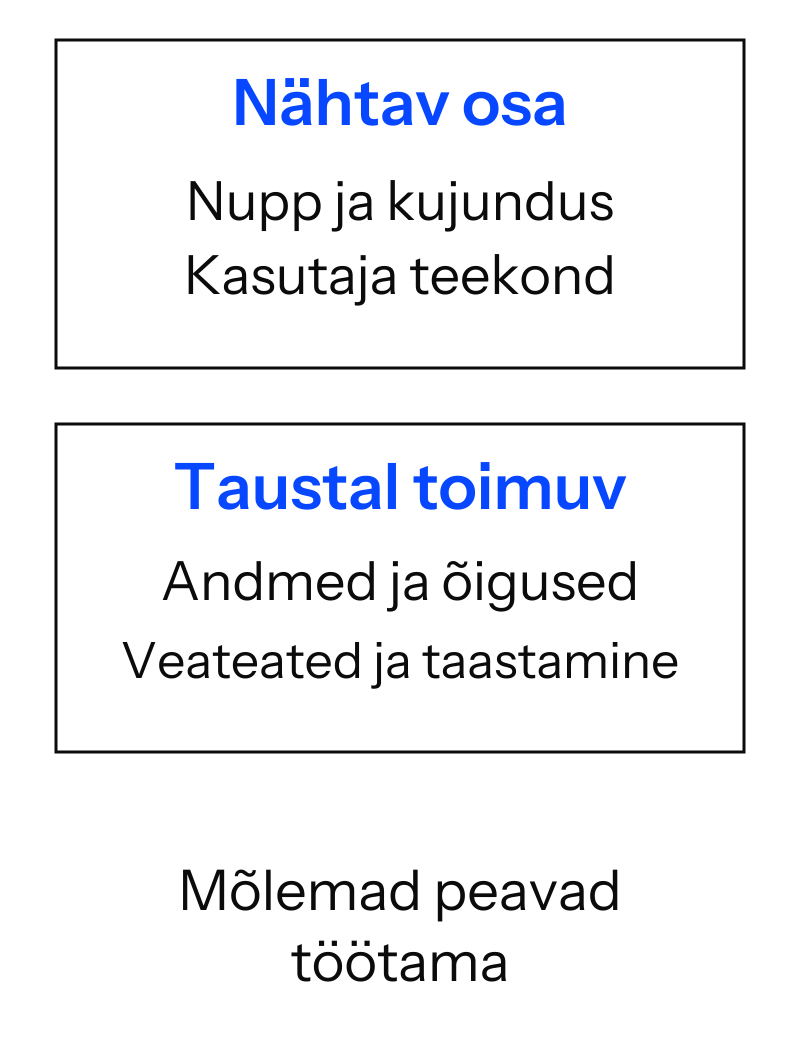
For a first project, I would at least test normal use, empty and invalid input, and the mobile view. I would also check what happens after refreshing the page. Should data persist, or is it a one-off calculation? That should be a deliberate choice. Both Claude Code’s workflow guidance and Codex’s recommendations emphasise a specific, verifiable result and testing.
If an application starts using data from a store, calendar or another service, connections and access permissions come into play. I discuss one way of connecting services in ‘What is an MCP connection?’. Not every vibe-coded application needs MCP.
What happens after the first version?
Before putting a tool into use, I would record where its source code lives, how to roll back a change and who owns the necessary accounts. The solution should not exist only inside one conversation.
Costs also matter. An AI subscription or usage allowance, hosting, a domain, a database and external services can be separate expenses. A small experiment may fit within free allowances; another may need paid services from the start. The cost depends on the particular solution, not the label ‘vibe coding’.
For me, a good first project is something I can open the next day, test again and continue improving. That is how an experiment gradually becomes a tool I can use.
What should you expect from vibe coding training?
Vibe coding training is most useful when you leave with an approach you can repeat on your own task. A nice page appearing on the trainer’s screen does not establish that by itself.
In my Lovable and web tools training , we start with the purpose of the page or tool, build a first version and test the user’s journey. Codex and repeatable-work training also covers files, spreadsheets and clearly scoped website changes.
We choose the tool to suit the task. Preparation, improvements and checking the result are all part of the exercise. I do not want you to learn only how to copy one demonstrated sentence. You need to know how to continue independently.
Frequently asked questions
Do vibe coding, vibe koodimine and vibekoodimine mean the same thing?
They are generally used for the same concept. The Estonian version of this article uses vaibkoodimine alongside the English term vibe coding. The important distinction is whether we mean free-form experimentation or reviewed AI-assisted development.
Can you start vibe coding without knowing how to code?
Yes, you can start a simple prototype without programming experience. You need to understand the desired result and have a way to check it. A more complex application increases the need for technical assistance.
Is vibe coding only for websites?
No. AI can also help create calculators, data-processing tools, internal views and other applications. The possibilities depend on the environment and on the data and connections the task needs.
Do Lovable, Claude Code and Codex replace a developer?
They can reduce manual implementation work and help you solve a small task yourself. Designing, reviewing and maintaining a complex system still require the relevant skills. Whether you need a developer depends on project requirements, not just the tool’s name.
A page, calculator or repetitive task you would like to make easier is a good place to start. Describe your idea and ask about AI training for your team. Let’s look together at a first step you can take.