

MCP, or Model Context Protocol, is an open standard that lets AI applications communicate with external tools and data sources. An MCP connection can let AI search your documents, read product data from an online store or use features in another application. Its capabilities depend on the connected service and the permissions granted. Official introduction to MCP.
What interests me most about AI is the point where a conversation turns into completed work: I can explain a task in my own words without then moving all the data between windows myself.
That is where MCP comes in. The name sounds technical, but an ordinary online-store task makes the idea easier to understand.
An online-store example: find products with missing descriptions
Imagine you run an online store and want to improve incomplete product descriptions. Normally, you open the admin area, find the products, copy their details into an AI conversation and later move the finished descriptions back.
With a suitable MCP connection, you could give this task:
Find five products in the store that have no description. Review their existing data and draft descriptions. Show me the results before saving anything.
The AI application can use the product-search tool available through the connection. It retrieves the relevant store data, and AI drafts the text from that information. You check that the material, dimensions and other important details are correct.
If the connection also provides an editing tool and its use is authorised, the descriptions can then be saved to the store. A read-only connection cannot do that.
This is an illustrative workflow, not a promise that every online-store connection supports every step. A good connection can remove much of the copying and searching, letting AI work with information already in your store.
How does MCP work?
There are three important participants. You use an AI application, such as a chat interface or work assistant. Inside it, an MCP client manages communication. An MCP server provides specific tools or datathat the application can access.
A ‘server’ does not necessarily mean a separate computer you have to buy or maintain. It can be a program on your computer or a service run by a provider. These roles are also explained in the official MCP architecture guide.
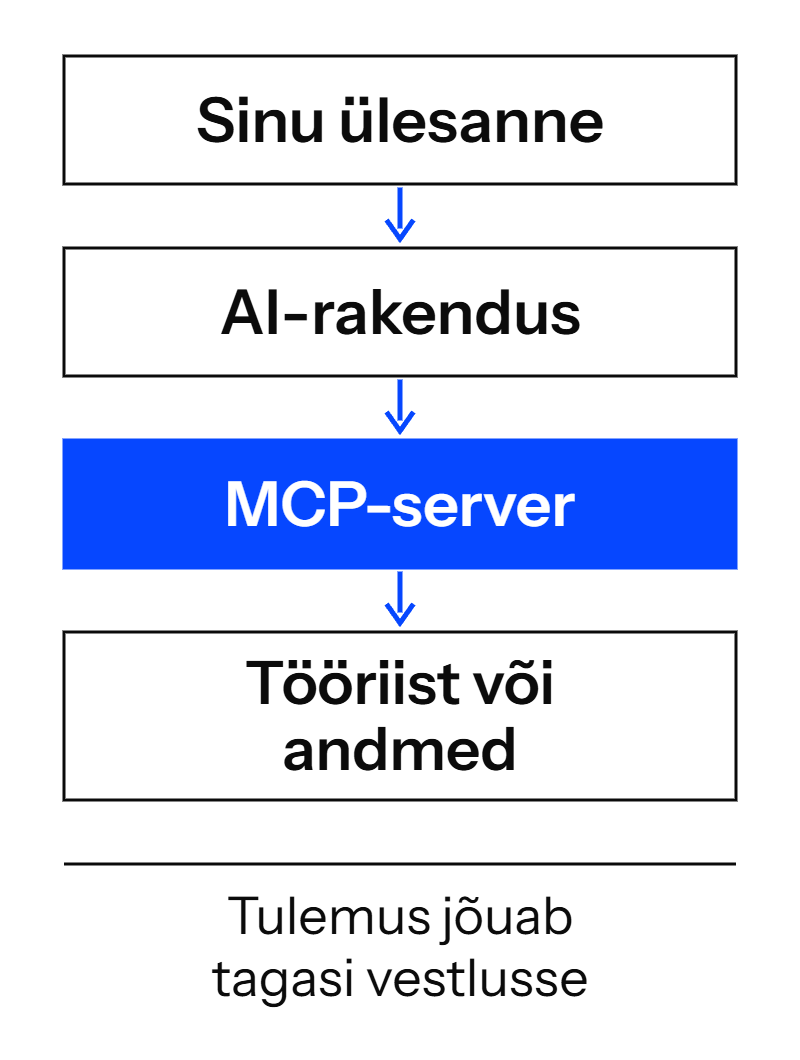
The connection tells the AI application which capabilities are available. To complete a task, the application requests the appropriate tool and receives its result: a product list, a document or confirmation that a change was saved. This is described in the MCP tools specification.
An MCP server can provide three types of capability:
- Tools perform an action: search for a product, request data or change a record.
- Resources provide background information to read, such as document content or a database structure.
- Prompt templates help start a recurring task consistently, such as preparing a report.
Not every server has to offer all three. The distinction is explained in the MCP server overview.
Who benefits from it?
MCP is particularly useful when the information you need is spread across several places and you repeatedly move it by hand. Beyond an online store, consider these tasks.
Service provider: find a customer’s previous enquiry and the relevant service in your price list, then draft a quotation. You check that the scope and price fit the situation.
Marketer or content creator: retrieve current product data from the store and brand guidelines from a document, then draft campaign copy. This reduces the risk of relying on an old text file with outdated prices or product details.
Manager or project manager: bring together the latest project notes and open tasks for a meeting overview. Ask for references to the source information so you can check what matters.
An example from business software is the Microsoft Dataverse MCP server. It lets AI applications use business data and specific data tools. The environment, permissions and supported client need to be configured correctly.
For me, the value starts with a simple question: which repetitive computer tasks currently depend on you acting as the link between systems? That is a useful place to find a first use case.
How do MCP, APIs and AI agents differ?
These terms often appear together, but they describe different parts of the work.
| Term | What does it do? |
|---|---|
| API | A software interface through which another program can request specific data or actions, such as querying an online store’s products. |
| MCP | A common way for an AI application to discover and use available tools and data. An MCP server may itself call a service’s API. |
| AI agent | An AI system that chooses the next steps during a task and uses tools to carry them out. MCP can be one way of connecting to those tools. |
MCP is often used on top of an existing API, avoiding the need to build the same service connection from scratch for every AI application. The application and server must still support compatible features and protocol versions. MCP architecture, version compatibility and Anthropic’s explanation of AI agents.
An item labelled ‘app’, ‘connector’ or ‘connection’ in an application menu does not by itself prove it uses MCP. The user sees a product menu; MCP describes the agreement for communication between programs.
Where did MCP come from?
Anthropic introduced MCP on 25 November 2024. The aim was to give AI applications a common way to connect to external tools and data. The specification and development tools were released alongside the announcement. Anthropic’s original announcement.
On 9 December 2025 , Anthropic announced that MCP would move to the Agentic AI Foundation, or AAIF, under the Linux Foundation. Technical decisions remained with MCP’s maintainers and contributors. Anthropic originated MCP, but the project has since become a broader shared effort. Transfer announcement and Explanation from the MCP project.
Where does MCP stand in October 2026?
I checked the technical sources for this article on 13 October 2026. At that point, the current protocol version was 2026-07-28. For an everyday user, three developments are particularly useful to understand.
Connections are developing alongside workplace tools
The July version made it easier for providers to handle many requests and distribute load. This primarily matters to developers. As a user, your capabilities still depend on the particular application and connection you use. 28 July release announcement.
A conversation can include an interactive workspace
MCP Apps can bring a clickable chart, form or rotatable 3D model into an AI conversation. You can explore data and change selections without typing every small step again.
This is an optional extension. Both the AI application and the connected service must support it. An ordinary MCP connection does not automatically include such an interface. Official MCP Apps overview.
Longer tasks can return their results later
There is also a Tasks extensionfor checking a task’s status and retrieving its result later. A larger task, for example, may finish after the initial request. This also requires support from both sides. Tasks extension documentation.
The roadmap published in August includes plans for event-triggered work, notifications and permissions delegated to agents. These are development directions, not a promise that every current application already supports them. MCP roadmap explanation.
How do you start using an MCP connection?
I would start with one small task, such as finding a particular document in your files or retrieving product information from a store.
- Choose the work you want to make easier. This makes clear which information AI needs to access.
- Check what your AI application supports. Look for a ready-made connection to the service or an option to add an MCP server. Availability may depend on your plan and organisation settings.
- Use the service’s official connection or a trusted server. For a remote connection, you usually add the server address and sign in to the service. A local server may need installation.
- Start with only the permissions needed. Read access is often enough for finding information.
- Try a small work task. Compare the result with its source. Add editing capabilities once you understand what the connection does.
The exact controls depend on the application. The general process is explained in the official MCP remote-server guide.
Reading and changing are different actions
Looking up a product’s price and changing that price are very different tasks. The same applies to drafting an email and sending it to a customer.
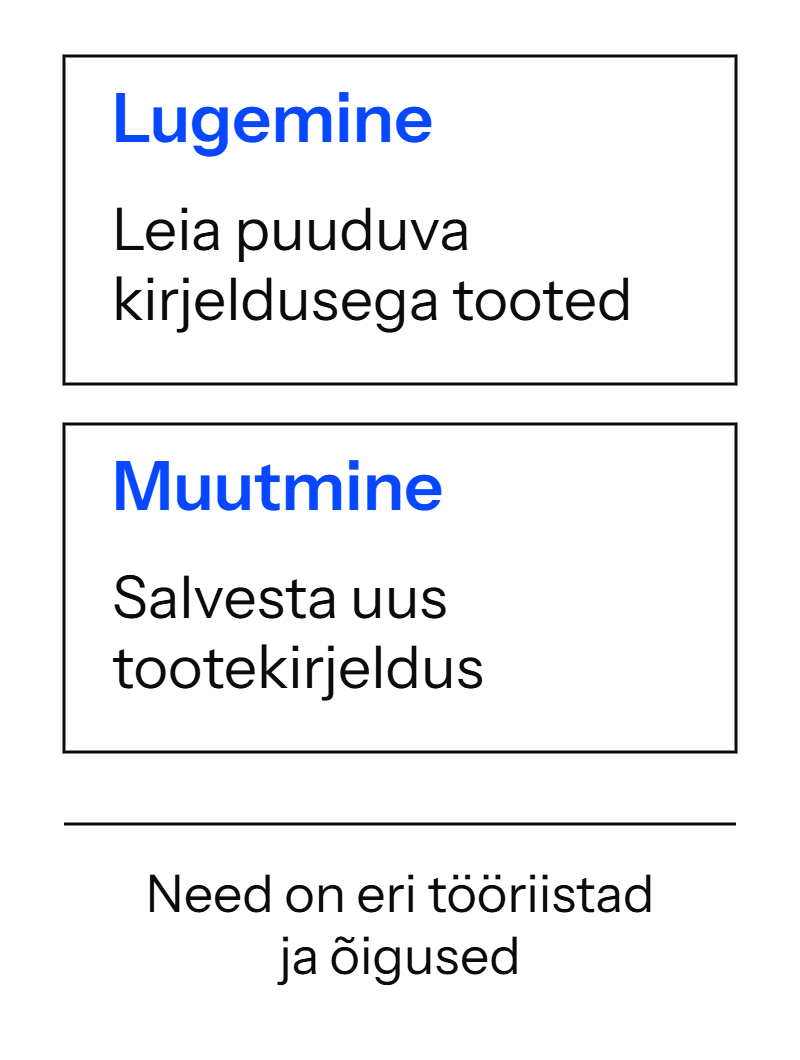
The name MCP does not guarantee that a connection is secure or that every action always asks for confirmation. That depends on the AI application, the server implementation and the permissions you grant. The official security guidance recommends limiting access to what the task requires.
I would begin with reading and drafts. Before changing store content or sending anything out, I would want to see exactly what will happen. Configure that control in the tool’s permissions rather than relying only on a request typed into a conversation.
Frequently asked questions about MCP
Do you need programming skills to use MCP?
Using a ready-made connection may not require code. A custom service or specialised workflow may need a developer. It depends on whether the required server already exists and works with your AI application.
Is MCP free?
MCP is an open standard. There is no single monthly fee attached to its name, but the AI application, connected service, server hosting or requests may have costs. Dataverse, for example, has its own usage and licensing terms.
Does MCP give AI access to my whole computer?
An MCP connection provides access to what its server exposes and permissions allow. That might be one data source or a selected folder. Servers with broad access need careful permission review.
Do I need MCP if I only use ChatGPT?
For advice, brainstorming or working with text you add to a conversation, you can often manage without another connection. MCP becomes interesting when you want AI to work with existing tools and current data.
Start with work you would like to do less manually
I like being able to give AI more of my computer-based work. I have written, for example, about how Codex migrated eight websites while I slept. MCP explains one way AI can connect to tools for such work. Not every task completed with AI has to use MCP.
As a trainer, I also draw on my daily work. To start in your business, we take one specific task and examine where the information lives, what AI can do and what you need to check yourself. Ask about AI training for your team.